





Founding price Clearpane for $9 instead of $19. For the first 300 customers. then $12 · $15 · $19 Claim Yours →

Activity Monitor,in plain English.

Explains every app you run, and 1,000+ processes behind them

See what's slowing your Mac down, what every process is, and what's safe to quit. One clear answer first, the numbers if you want them.

Free check-up · No account · macOS 14 or later

Real questions, plain answers

The questions Mac owners ask every day.

Thread titles from Ask Different and MacRumors, shortened. Here's what Clearpane tells you about each one, right in the app.

Try the Free Check-up

View counts as of November 2026.

macOS core (kernel)kernel_task · part of macOSMade by Apple · Signed

macOS is holding back CPU time to cool your Mac down.

What it does

The heart of macOS. It runs the hardware, memory and files. When the chip gets hot, macOS gives kernel_task CPU time on purpose so other apps get less, which lets the chip cool.

When it gets busy

  • Your Mac is hot, often from a heavy app, a warm room or a blocked vent
  • Lots of disk or network activity
  • Charging while working hard

Safe to quit?

Don't quit it. It can't be quit. It is macOS itself. Leave it running. Find what is heating your Mac and quit that instead.

Why it helps

Stop guessing what your Mac is doing.

Activity Monitor shows a thousand numbers. Clearpane starts every screen with a sentence.

The verdict

One clear answer

Open it and read one sentence: what's wrong, which app is behind it, and the fix.

Try the Free Check-up
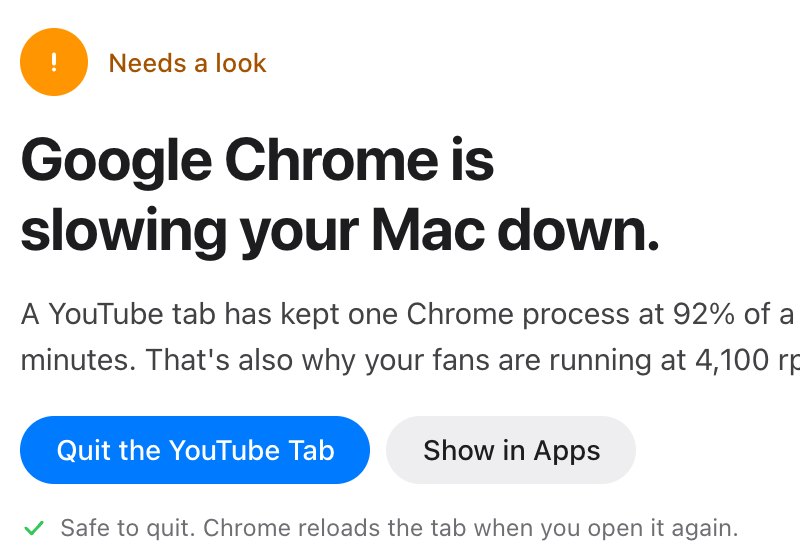
Google Chrome is slowing your Mac down. Quit the YouTube tab.
Plain-English guide

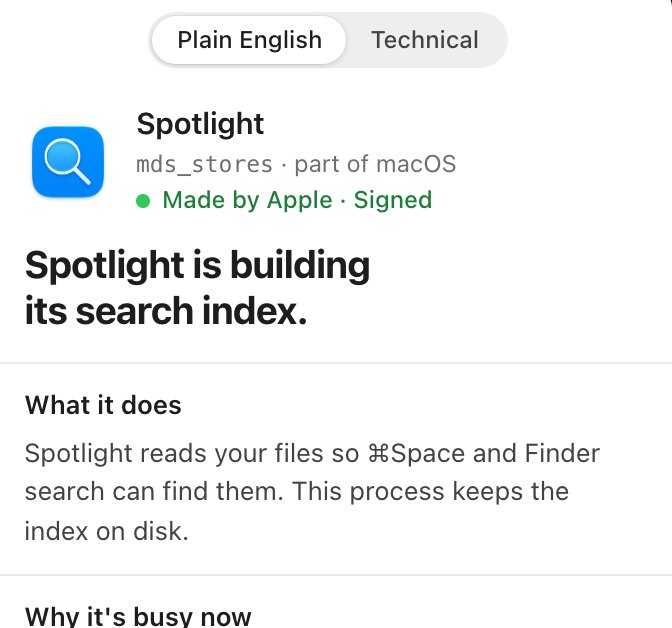
Every process, explained

What it is, whose it is, what's normal, and what happens if you quit it.

Spotlight is building its search index, explained in plain English
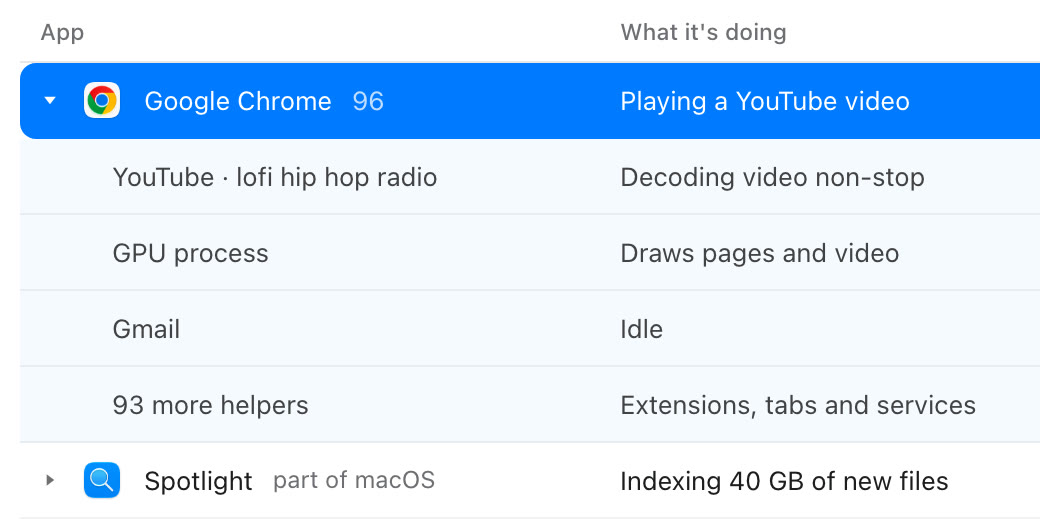
Grouped by app

Apps, not a thousand processes

Chrome's 96 helpers count as Chrome, and each app says what it's doing right now.

Google Chrome is playing a YouTube video; its tabs and helpers are listed underneath
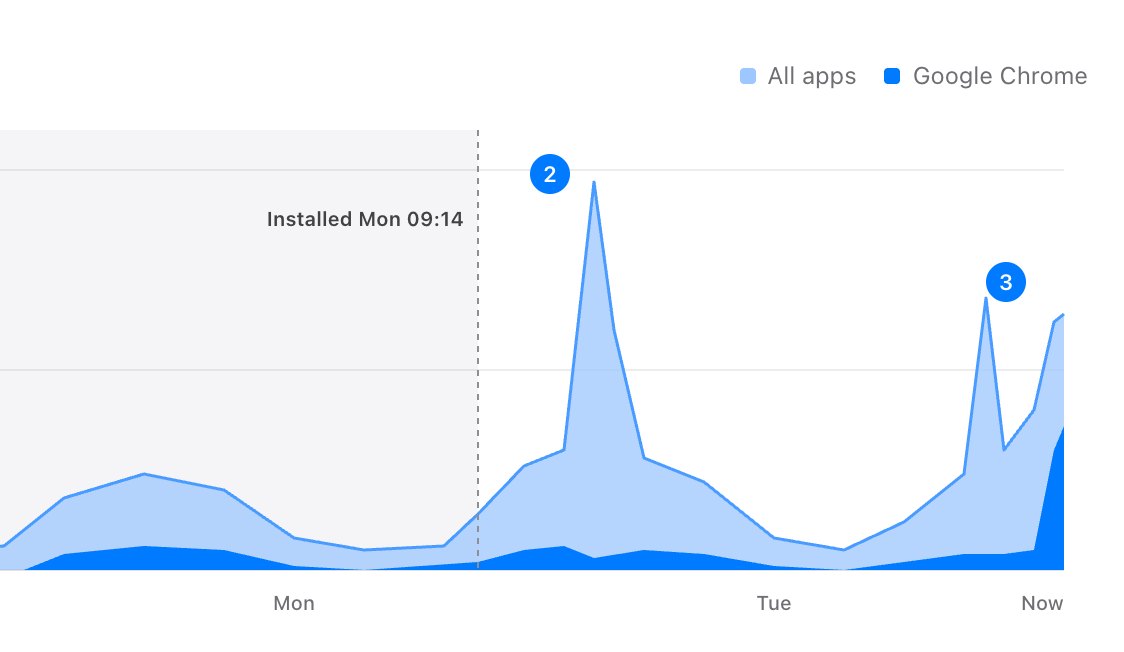
4 days before install New

History from day one

macOS keeps its own record. Clearpane reads it, so you see the 4 days before you installed it.

A 4-day chart, including the days before Clearpane was installed
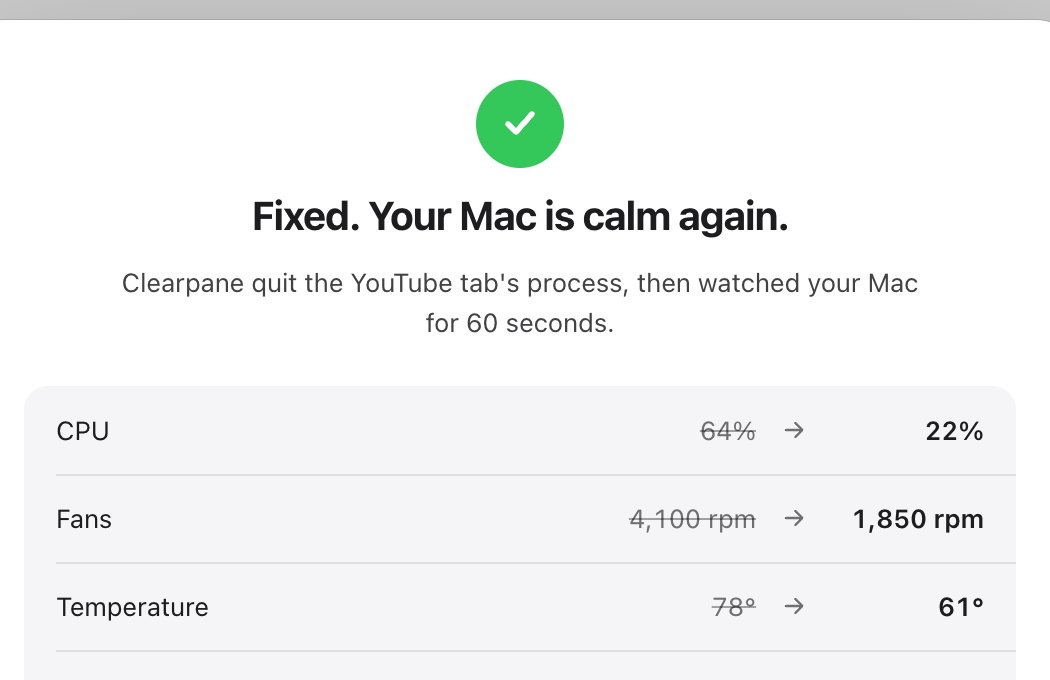
Before and after

Fix it, and see it worked

Quit the culprit. Clearpane watches for a minute and shows the before and after.

Fixed: CPU 64% to 22%, fans 4,100 to 1,850 rpm, temperature 78 to 61 degrees
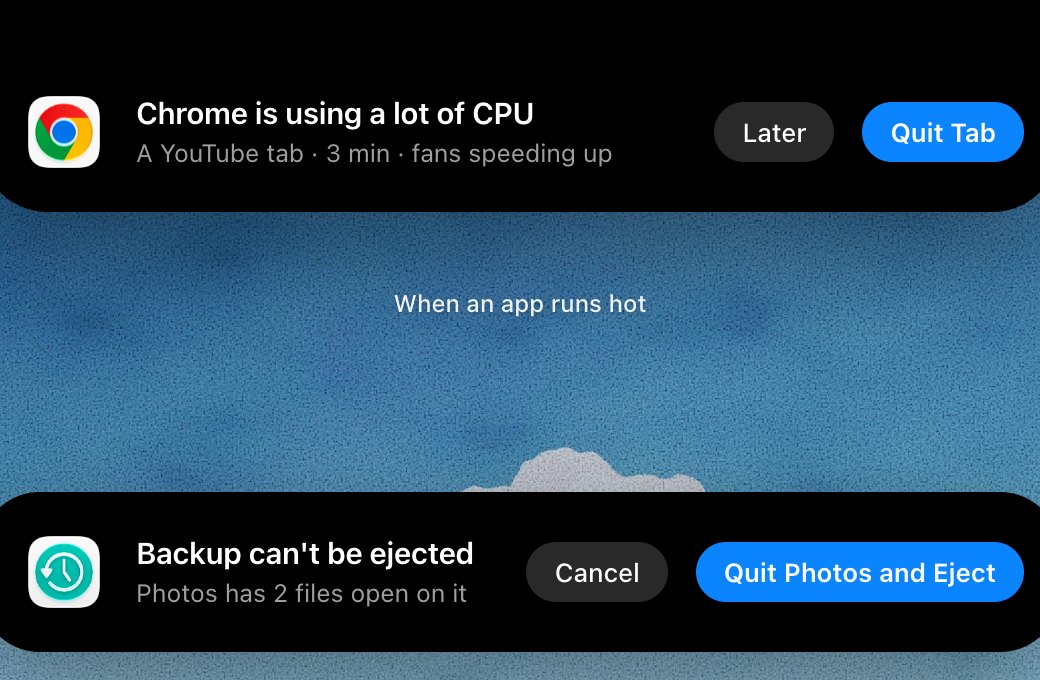
Heads-up

Alerts from the notch

A heads-up before the fans spin up, with the Quit button right there.

Alerts from the notch: Chrome is using a lot of CPU; Backup can't be ejected
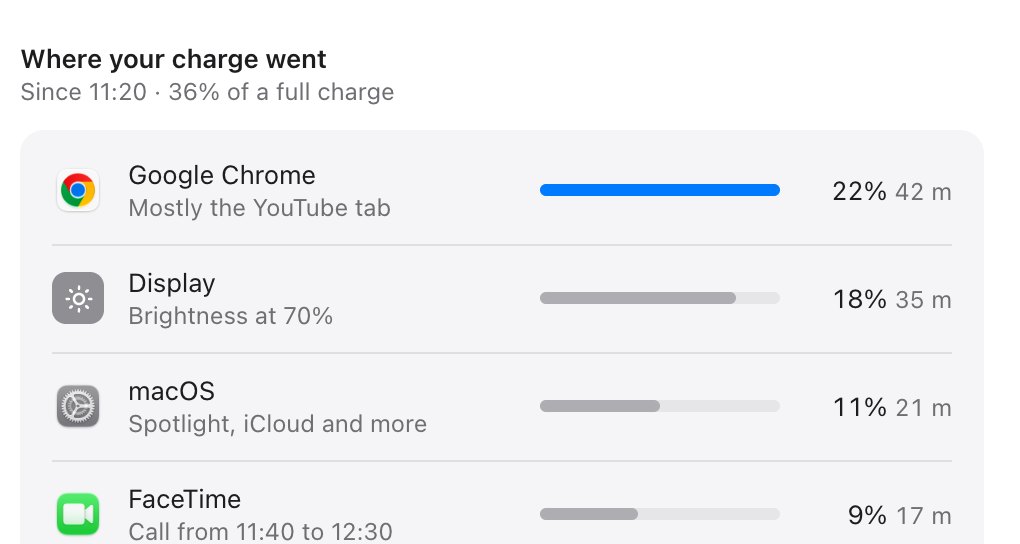
Battery

Battery, in minutes

Where your charge went since you unplugged, and the time you'd get back.

Where your charge went: Chrome 22%, display 18%, macOS 11%
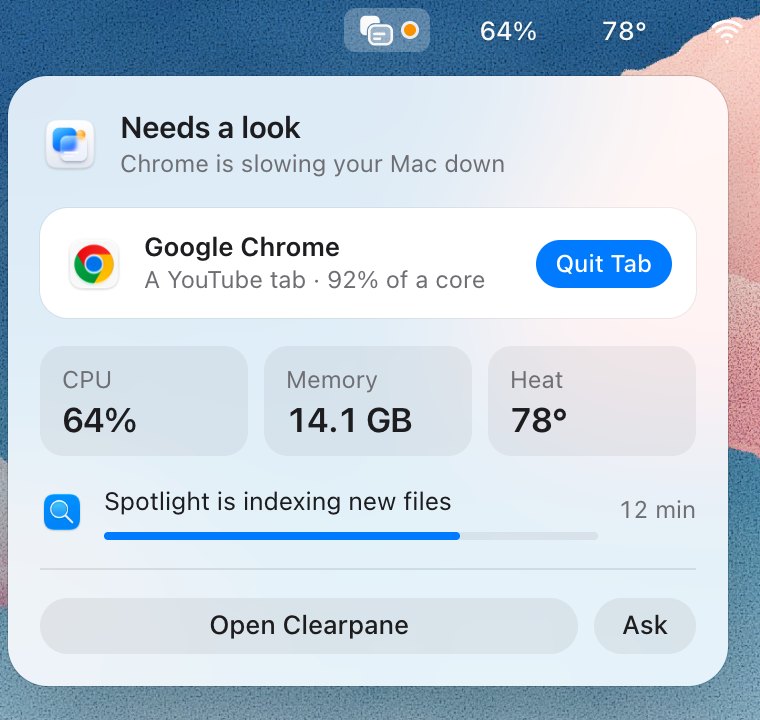
Always there

Clearpane in your menu bar

It shows a dot before your fans speed up. Click it for the culprit.

Download for Mac
The menu bar popover: needs a look, Google Chrome, Quit Tab
And there's more

Everything a power user wants. Still in plain English.

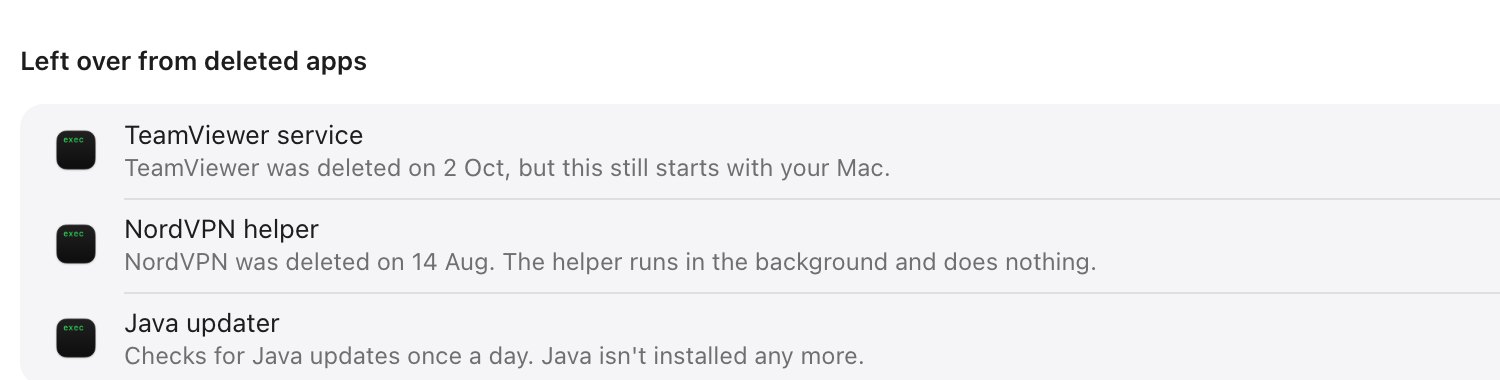
Left over from deleted apps: TeamViewer service, NordVPN helper
Tidy up

Startup items, decoded

Which app each one belongs to, and the leftovers from apps you deleted.

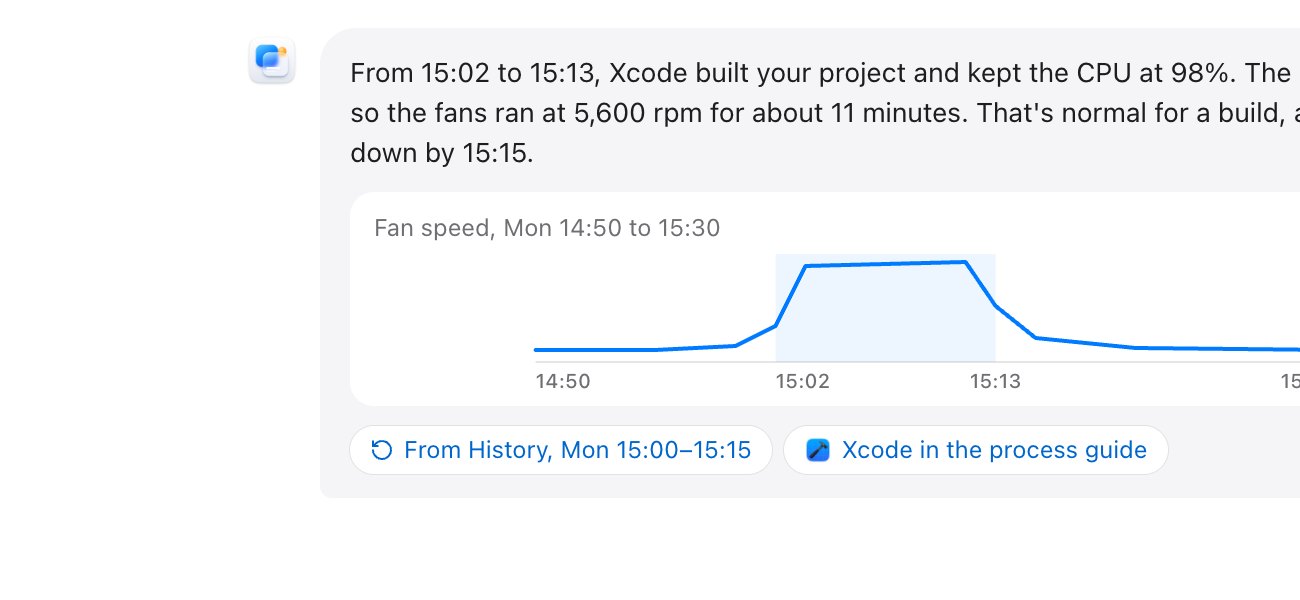
An answer: an Xcode build kept the CPU at 98% from 15:02 to 15:13
Ask in your words

Ask Clearpane

"Why were my fans loud at 3 pm?" Answered from your Mac's own data, on your Mac.

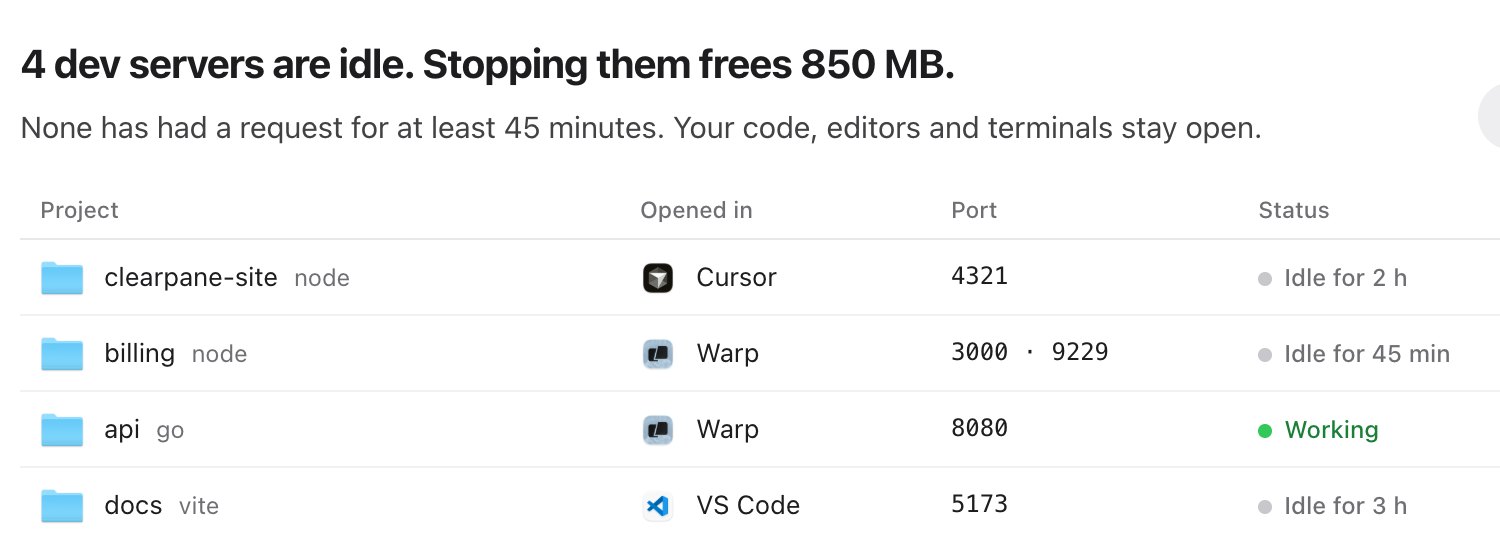
4 dev servers are idle; stopping them frees 850 MB
For developers

Dev servers, ports and Docker

Every project you left running, the ports it holds, and one button to stop the idle ones.

Heat and fan curves Storage and stuck disks Network per app Bluetooth batteries Volume for every app AI agents and plan limits MCP server and command line Widgets Every raw number, one click away






Every feature

Every day

  • One-sentence verdict
  • “Busy, and that’s normal”
  • Top apps right now
  • Today’s timeline
  • Apps, not processes
  • What each app is doing
  • Safe to quit?
  • Every process explained
  • Who signed it
  • Every raw number
  • Quit and Force Quit
  • Pause for an hour
  • Fix, then see it worked
  • Undo
  • Search and sort

Your Mac

  • CPU and every core
  • Do you need more memory?
  • Where your charge went
  • Battery health and cycles
  • What keeps it awake
  • Temperatures and fans
  • Fan curves Soon
  • Storage by kind
  • What is System Data?
  • Disks that won’t eject
  • Network per app
  • Ports open to your network
  • Wi-Fi quality
  • Graphics per app
  • Neural Engine use

History and alerts

  • 4 days before you installed
  • Up to a year of history
  • What happened, in words
  • Top apps over days
  • Alerts from the notch
  • “Tell me when…” rules
  • Tell me if it comes back
  • Quiet during Focus
  • Unsigned app alerts

More

  • Startup items, decoded
  • Leftovers from deleted apps
  • Volume for every app
  • Who used the microphone
  • Bluetooth batteries
  • Dev servers and ports
  • Docker and Homebrew
  • AI agent sessions
  • AI plan limits

Around your Mac

  • Status in the menu bar
  • Menu bar readouts
  • Popover with the culprit
  • Four widgets
  • Shortcuts actions
  • Ask Clearpane
  • Share a report
  • MCP for AI apps
  • The clearpane command

Private and simple

  • Stays on your Mac
  • No account
  • No analytics in the app
  • Shows its own cost
  • Light and dark
  • 8 languages
  • macOS 14 and later
  • Pay once

Feature check · November 2026

How Clearpane compares.

Six ways to see what your Mac is doing, checked against each app's website.

ClearpaneActivity MonitoriStat MenusStatsVitalsCleanMyMac
Apps grouped, not raw processes–PartlyPartlyPartly
Every process explained, in the app–––On its website–
"Safe to quit?" for every app–––––
History from before you installed it–––––
Runs on macOS 1415 and later
Price$19 onceFree$11.99, paid upgradesFree$49 onceAbout $40 a year

Pricing

Pay once. Keep it.

Every update included. No subscription, no account.

Free Check-up
$0

See what's wrong right now.

  • The one-sentence answer
  • Any process, explained
  • Apps grouped, with "safe to quit?"
  • The menu bar status icon
Download Free
Clearpane · 2 Macs
$9$19
$9→$12→$15→$19

Founding price for the first 300 customers. Then $12, then $15, then $19. For 2 Macs.

  • Everything in the free check-up
  • History, from 4 days before you install
  • Alerts, and fixes that show they worked
  • Battery, heat, storage, network and more
  • Ask Clearpane, reports and widgets
Buy for $9
Family · 5 Macs
$29

One key for 5 Macs in one home.

  • Everything in Clearpane
  • Reports from every Mac come to you
Buy Family

7-day full trial · 14-day refund · 50% off for students and teachers · Payments by Polar

Questions

Good to know.

Does it clean my Mac or free up memory?

No. macOS manages memory well on its own, and cleaners mostly delete caches your Mac then rebuilds. Clearpane tells you what's really going on and helps you quit the right thing.

Will it slow my Mac down?

Clearpane shows its own CPU use at the bottom of the Apps view, so you can check it any time.

Why isn't it on the Mac App Store?

App Store apps can't see other apps' processes. Clearpane is signed by us, notarized by Apple, and updates itself.

What does the optional helper do?

It lets Clearpane see macOS's own processes too, about one in three, control the fans, and find which app is holding a disk. You approve it in System Settings and can remove it in one click.

Which Macs does it run on?

macOS 14 Sonoma and later, on Apple silicon and Intel. Ask Clearpane needs Apple Intelligence.

Your Mac, clear as glass.
It tells you why.

Free check-up · No account · macOS 14 or later